
Hourly Sales Flow (Today)
Shift sales revenue throughout the day
Top Weighed Commodities (kg)
Ranked by physical scale weigh volume
Recent Scale Activity
Last 20 transactions ordered by date & time
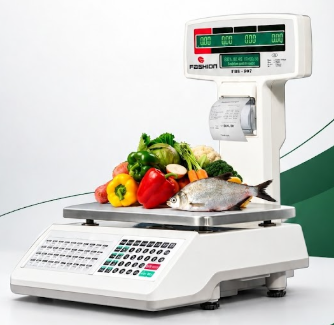
Physical Scale Keypad Shortcuts
Quick keys mapped to physical membrane buttons
PLU & Price Management
Manage commodity codes, unit rates, and sync directly to physical scale memory.
| PLU | Item Description | Unit Price (රු) | Type | Actions |
|---|
Physical Keypad Matrix (Hotkeys 1–120)
120 Membrane KeysDigital twin of the physical scale membrane keys. Click any key to assign, edit, move, or clear.
Hardware Scale Connection
Configure direct edge communication with your barcode printing scale.
Scan Printed Scale QR Slip
Auto-pairs with physical scale via printed Bluetooth / IP QR code.
More: Business Hub & Analytics
LiveSales Reports, Inventory, Forecast, Purchases & Profit and Loss Suite
Visual Flow & Trend
Subscription & Device Licensing
Cloud SaaS billing status, device hardware serial lock, and license enforcement.
Green Valley Grocery
PRO MULTI-SCALESystem Settings & Devices
Scale hardware network parameters, SaaS subscription, and security controls.
Device Hardware Information
Physical weighing scale connection & network identity
App Screen Lock (PIN Security)
Prevent unauthorized access when app is minimized or backgrounded
Require 4-digit PIN every time the app re-opens
Cloud SaaS Subscription Details
Enterprise Multi-Branch & Multi-Scale License
How to Connect Multiple Scales
Add & manage multiple scales across shops and branches
Set Static IP on each Physical Scale
Assign a unique local IP on your Wi-Fi/Ethernet router to each scale.
Example: Scale 1 = 192.168.1.11, Scale 2 = 192.168.1.12, Scale 3 = 192.168.1.13. Default port is 33571.
Assign Scale ID in Scale Keypad Menu
On the physical scale keyboard, press MENU → System Config → Scale ID. Set Scale 1 to ID 1, Scale 2 to ID 2, etc.
Register in App or Cloud Bridge
Tap + Add Scale button above. Enter the Branch, Scale Name, and IP address. The Cloud Bridge connects automatically and polls all scales simultaneously in the background!
Phone Storage & Data Management
Manage on-device cache, PLUs, keypad shortcuts, and sales logs
Clearing data from this phone will NEVER delete anything from your main XAMPP MySQL database. Your central store catalog, scales, and complete sales transactions remain safely preserved in the cloud/server.